


Products

.svg)


.svg)
Boost your visibility with smart advertising strategies.

Updated March 2026
The Meta Conversions API (CAPI) is essential for modern e-commerce advertising. By sending key customer actions (like purchases or page views) directly from your GearLaunch store's server to Meta's servers, it improves data accuracy, ad optimization, and reporting reliability—especially as browser privacy restrictions (e.g., iOS 14+) limit traditional Pixel tracking. Key Steps to Set Up CAPI (System User Access Token Method)
Integrating the Meta Pixel and Conversions API (CAPI) into your GearLaunch store is essential for understanding the actions people take on your website and getting the advertising results that matter most to your business. Setting up CAPI properly ensures more accurate tracking, better audience targeting, and higher-performing campaigns.
Here is your comprehensive guide to configuring the Meta Conversions API for your GearLaunch store.
A common question when running multiple niches on a single store is whether you need a separate pixel for each niche. The standard recommendation is to use just one pixel per website.
Using a single pixel won't mess up your tracking. If you want to segment your audiences by niche, you can simply create a Custom Audience and filter users by the specific URLs they visited. To do this, create an audience of "People who visited specific web pages" and set the rule to include people whose visited URL contains your specific niche's category or campaign path. Alternatively, you can also use UTM parameters to track specific campaigns or designs.
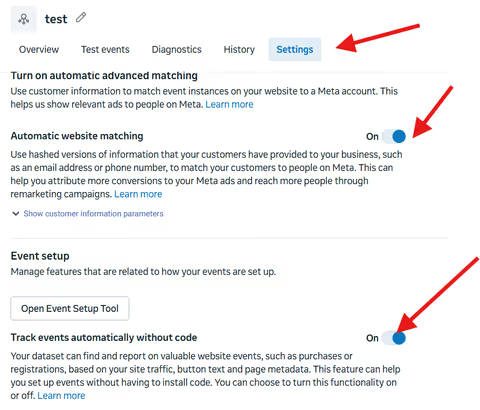
Before linking CAPI, you should configure your Meta Pixel to capture as much data as possible automatically. Navigate to your Pixel's "Settings" tab in Meta Events Manager and turn on the following options:
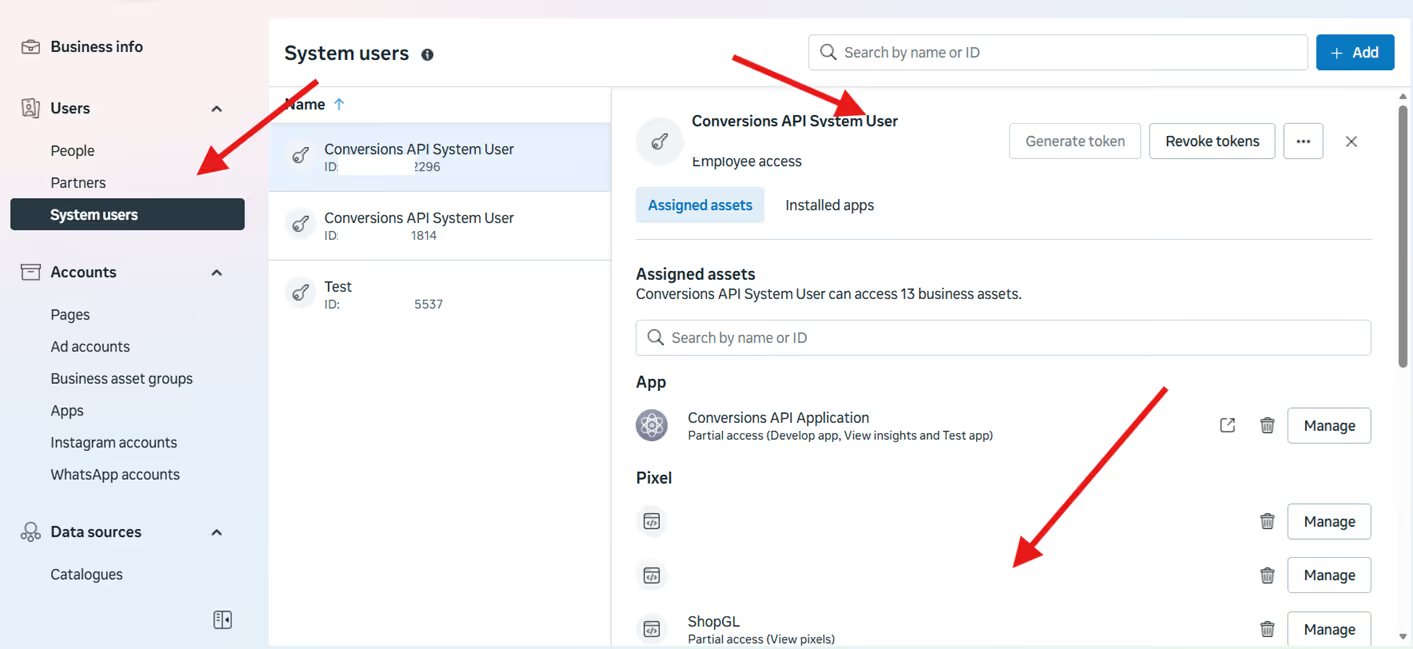
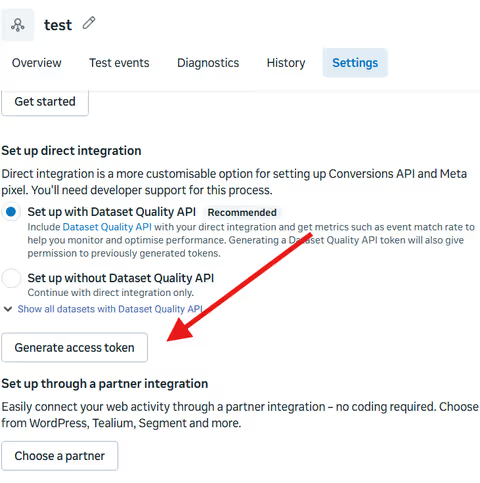
To link your GearLaunch store directly to Meta's CAPI, you need an access token. If you find that the "Generate access token" button is missing or unclickable in your Pixel settings, follow these steps to grant the correct permissions:
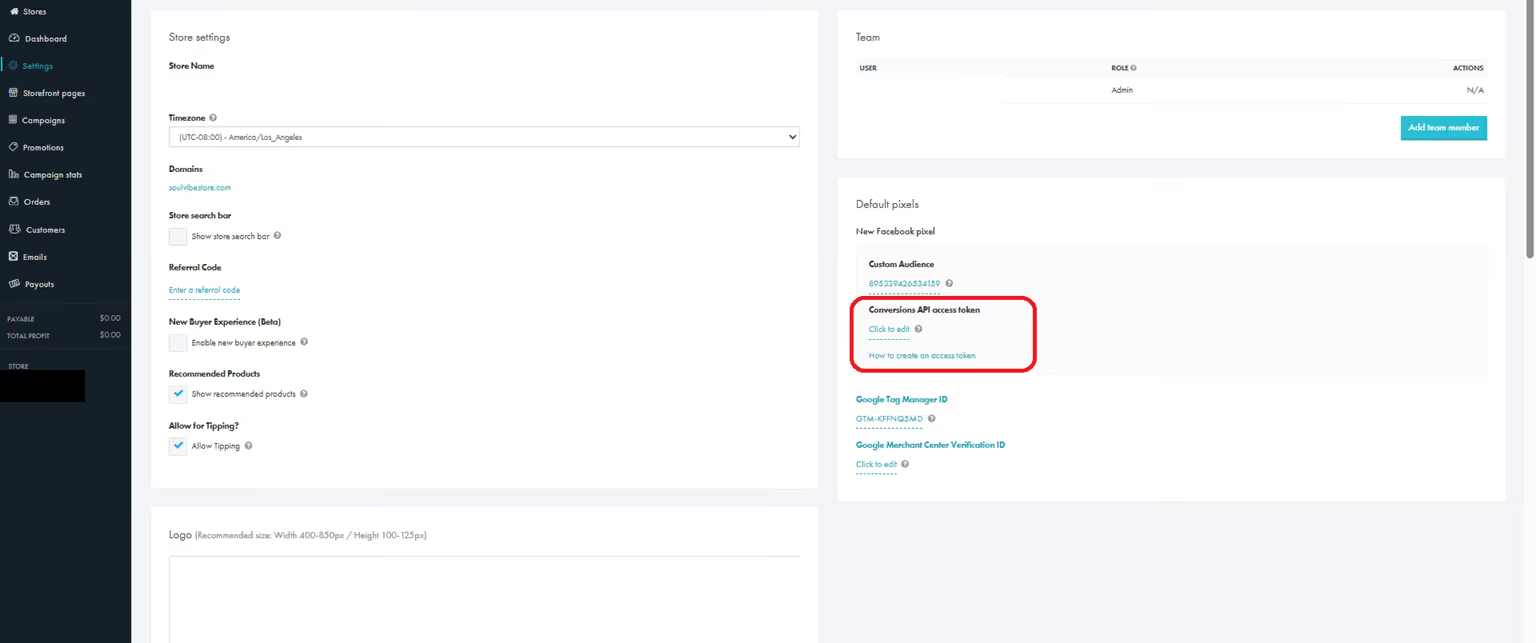
Once connected, you must verify that Meta is safely receiving your data. Go to the Test events tab to verify that activity is being recorded.
Often, you may see an active error in the Diagnostics tab asking you to "Confirm domain that belongs to you". To fix this:
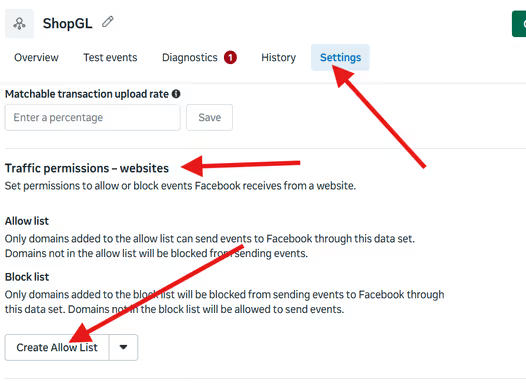
You should also review your custom events in the Diagnostics tab. Simply review the incoming events, allow the correct ones, and deny any incorrect ones.
Once your domain is allowed and errors are cleared, your GearLaunch store is fully integrated with the Meta Conversions API. You can immediately start using these events to optimize your ad campaigns for specific conversions like leads or purchases. Keep in mind that if your store is new, it may take some time to build an audience list large enough for lookalike audiences or retargeting, but your conversion campaigns are ready to go!
In the world of Facebook advertising, tracking your data accurately is the difference between a winning campaign and a wasted budget. If you’ve been browsing the GearLaunch Academy, you’ve likely seen mentions of both the Meta Pixel and the Conversions API (CAPI).
But which one do you actually need? Let’s break it down.
🌐 The Meta Pixel: The Browser-Side Classic
The Pixel is a piece of JavaScript code installed on your website. When a customer visits your store, the Pixel tracks their actions (like "Add to Cart" or "Purchase") through their web browser using cookies.
The Problem: Modern privacy updates (like iOS 14+) and ad-blockers often "hide" these cookies. If the browser blocks the Pixel, you lose that data.
🛡️ Conversions API (CAPI): The Server-Side Solution
CAPI is the modern successor to the Pixel. Instead of relying on the customer's browser, CAPI sends data directly from the GearLaunch server to Meta’s server.
The Benefit: It bypasses ad-blockers and browser restrictions. It’s more secure, more reliable, and ensures your "Purchase" events are always recorded, even if the user has strict privacy settings.
Comparison at a Glance:
The primary difference between the Meta Pixel and the Conversions API (CAPI) lies in where the tracking data originates. The Pixel is a browser-side tool that relies on a customer’s web browser and cookies to track actions like "Add to Cart" or "Purchase." While this is simple to set up, it is increasingly vulnerable to ad-blockers and privacy updates (like iOS 14+), which can cause you to lose significant data.
In contrast, CAPI is a server-side solution that sends information directly from the GearLaunch server to Meta’s server. Because it doesn't depend on browser cookies or front-end scripts, it remains highly reliable and stable even when users have strict privacy settings enabled. Essentially, while the Pixel is a classic tracking method, CAPI acts as a modern safeguard, and using both together ensures your ad performance is measured with the highest possible accuracy.
Which one should you use?
The answer is both. Meta recommends a Redundant Setup. When you use both the Pixel and CAPI together, Meta’s system "deduplicates" the events. This means if the Pixel fails to see a sale because of an ad-blocker, CAPI catches it. This gives you the most accurate data possible to optimize your ads and increase your ROI.


.svg)
.svg)
.svg)